Leaflet maps
Leaflet.js is a lightweight mapping library that runs beautifully inside a WebView. This lesson builds an interactive map with city navigation and click-to-place markers, demonstrating how map events flow to Ruby and how Ruby controls the map via JsBridge.
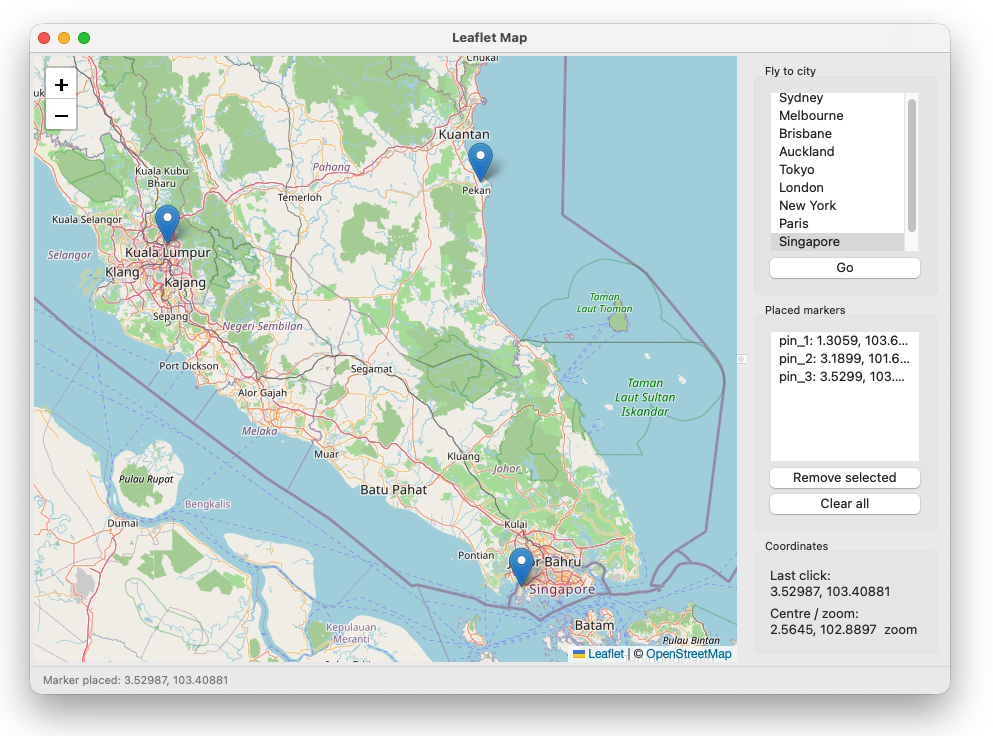
|
|
Requires internet access for Leaflet CDN and OpenStreetMap tiles.
File structure
leaflet_map_app/
├── main.rb
├── assets/
│   └── js/
│       └── js_bridge_client.js
└── lib/
    ├── map_frame.rb
    ├── js_bridge.rb
    ├── html/
    │   └── map_page.rb
    ├── models/
    │   └── cities.rb
    └── panels/
        ├── map_panel.rb
        └── sidebar_panel.rb
Loading Leaflet
lib/html/map_page.rb shows both approaches clearly.
Approach A — CDN (used in this app):
|
|
Simple, always up to date, requires internet. Good for development and apps that are always online.
Approach B — Local files as base64 data URIs (for offline use):
|
|
|
|
|
|
The Module 6 apps use Approach B since they need to work offline. The tile caching pattern for offline map tiles is covered there.
Map setup
A minimal Leaflet map needs a div, a tile layer, and an initial view:
|
|
The html, body { height: 100% } and #map { width: 100%; height: 100% } CSS is essential — without it the map renders at zero height and appears blank.
Map events → Ruby
Map events are forwarded to Ruby via RubyBridge.emit:
|
|
Ruby handles them in @bridge.on handlers inside MapPanel:
|
|
The frame receives these via callbacks and updates the sidebar — following the lesson 3.2 inter-panel communication pattern.
Ruby → map
Ruby controls the map by calling registered JS methods:
|
|
The MapPanel exposes these as clean Ruby methods:
|
|
The frame never calls @bridge directly — it calls @map_panel.fly_to(...). This keeps the WebView/JsBridge details inside the panel where they belong.
Marker management
Markers placed by JS clicks are tracked with IDs on both sides. When the user clicks the map, JS places the marker and emits mapClick with an ID. Ruby adds it to the sidebar list. When the user removes a marker from the sidebar, Ruby calls remove_marker(id) which calls the JS removeMarker method.
This is the bidirectional state management pattern that all the Module 6 map apps use — JS owns the visual markers, Ruby owns the list, IDs keep them in sync.
What comes next
The Module 6 route planner extends this app significantly — polylines, GeoJSON export, offline tile caching with a thread pool, context menus, and a more sophisticated state model. The architecture is the same: MapPanel wraps all WebView/Leaflet details, the frame coordinates, and everything talks through clean Ruby interfaces.
Previous: Live data with Chart.js | Next: Project: Markdown editor with WebView