Skip to content

A Preferences Panel

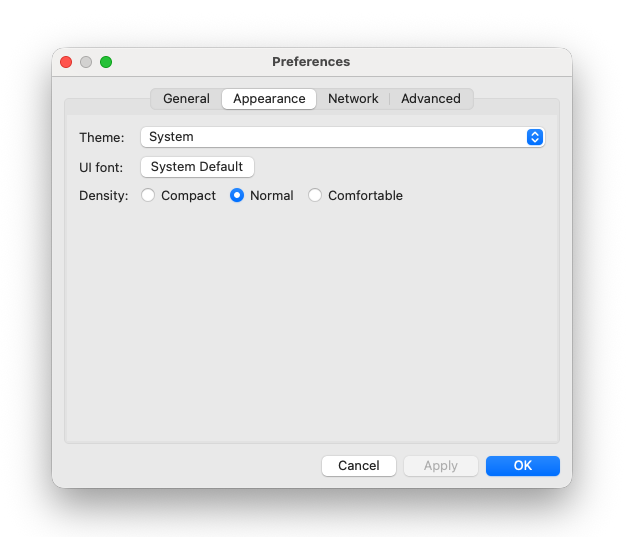
This project brings together everything from Module 2 — frames, panels, widgets, sizers, menus, and custom dialogs — into a single finished app. The result is a preferences dialog of the kind that appears in almost every real desktop application.

By the end you will have a tabbed preferences dialog with OK, Cancel, and Apply buttons, dirty state tracking, and four categories of settings across four tabs.
Preferences Panel

Wx::Notebook

Wx::Notebook is the tabbed container widget. Each tab is a separate panel added to the notebook — the notebook handles the tab strip and switching between panels automatically.

1
2
3
4
5
6
7
notebook = Wx::Notebook.new(parent)

page1 = Wx::Panel.new(notebook)
page2 = Wx::Panel.new(notebook)

notebook.add_page(page1, 'General')
notebook.add_page(page2, 'Appearance')

Each page is a plain Wx::Panel. You add widgets to each panel exactly as you would to any other panel — with sizers. The notebook itself goes into the parent’s sizer like any other widget.

That is all you need to know to use it. The capstone will show it in context.

What we are building

A preferences dialog launched from a menu item. The dialog has four tabs:

  • General — username, auto-save interval, startup behaviour
  • Appearance — theme selection, font, UI density
  • Network — proxy settings, timeout, connection options
  • Advanced — debug logging, cache size, reset button

The main frame is minimal — a text area showing the current preferences, and a Preferences menu item to open the dialog.

Step 1 — The main frame

Create preferences_app.rb:

 1
 2
 3
 4
 5
 6
 7
 8
 9
10
11
12
13
14
15
16
17
18
19
20
21
22
23
24
25
26
27
28
29
30
31
32
33
34
35
36
37
38
39
40
41
42
43
44
45
46
47
48
49
50
51
52
53
54
55
56
57
58
59
60
61
62
63
64
65
66
67
68
69
70
71
72
73
74
75
76
77
78
79
80
81
82
83
84
85
86
require 'wx'

class PreferencesFrame < Wx::Frame
  def initialize
    super(nil, title: 'Preferences Demo', size: [600, 400])

    @prefs = default_prefs

    build_menu
    build_ui
    bind_events

    layout
    centre
  end

  private

  def default_prefs
    {
      username:       'user',
      auto_save:      true,
      auto_save_mins: 5,
      start_maximised: false,
      theme:          'System',
      font_name:      'System Default',
      density:        'Normal',
      use_proxy:      false,
      proxy_host:     '',
      proxy_port:     '8080',
      timeout:        30,
      debug_logging:  false,
      cache_size:     256,
    }
  end

  def build_menu
    menu_bar  = Wx::MenuBar.new
    file_menu = Wx::Menu.new
    @prefs_id = file_menu.append(Wx::ID_ANY, "&Preferences...\tCtrl+,").id
    file_menu.append_separator
    file_menu.append(Wx::ID_EXIT, "E&xit\tCtrl+Q")
    menu_bar.append(file_menu, "&File")
    set_menu_bar(menu_bar)
  end

  def build_ui
    @panel = Wx::Panel.new(self)

    @prefs_display = Wx::TextCtrl.new(@panel,
      value: prefs_summary,
      style: Wx::TE_MULTILINE | Wx::TE_READONLY)

    sizer = Wx::VBoxSizer.new
    sizer.add(Wx::StaticText.new(@panel, label: 'Current preferences:'),
              0, Wx::ALL, 12)
    sizer.add(@prefs_display, 1, Wx::EXPAND | Wx::LEFT | Wx::RIGHT | Wx::BOTTOM, 12)
    @panel.set_sizer(sizer)
  end

  def bind_events
    evt_close        { |event| on_close(event) }
    evt_menu(@prefs_id)  { on_preferences }
    evt_tool(Wx::ID_EXIT) { close }
    evt_menu(Wx::ID_EXIT) { close }
  end

  def on_close(event)
    event.skip
  end

  def on_preferences
    dialog = PreferencesDialog.new(self, @prefs.dup)
    if dialog.show_modal == Wx::ID_OK
      @prefs = dialog.prefs
      @prefs_display.value = prefs_summary
    end
    dialog.destroy
  end

  def prefs_summary
    @prefs.map { |k, v| "#{k}: #{v}" }.join("\n")
  end
end

Wx::App.run { PreferencesFrame.new.show }

We pass @prefs.dup to the dialog so changes inside the dialog do not affect the main app until the user clicks OK. This is the standard pattern for preferences dialogs — the dialog works on a copy, and only on OK do we accept the result.

Step 2 — The dialog skeleton

Add the PreferencesDialog class above PreferencesFrame in the file:

 1
 2
 3
 4
 5
 6
 7
 8
 9
10
11
12
13
14
15
16
17
18
19
20
21
22
23
24
25
26
27
28
29
30
31
32
33
34
35
36
37
38
39
40
41
42
43
44
45
46
47
48
49
50
51
52
53
54
55
56
57
58
59
60
61
62
63
64
65
66
67
68
69
70
71
72
73
74
75
76
77
78
79
80
81
class PreferencesDialog < Wx::Dialog
  attr_reader :prefs

  def initialize(parent, prefs)
    super(parent, title: 'Preferences', style: Wx::DEFAULT_DIALOG_STYLE | Wx::RESIZE_BORDER)

    @prefs = prefs
    @dirty = false

    build_ui
    bind_events

    set_size([520, 440])
    centre
  end

  private

  def build_ui
    panel    = Wx::Panel.new(self)
    @notebook = Wx::Notebook.new(panel)

    build_general_page
    build_appearance_page
    build_network_page
    build_advanced_page

    # OK / Cancel / Apply buttons
    @ok_btn     = Wx::Button.new(panel, id: Wx::ID_OK,     label: 'OK')
    @cancel_btn = Wx::Button.new(panel, id: Wx::ID_CANCEL, label: 'Cancel')
    @apply_btn  = Wx::Button.new(panel, id: Wx::ID_APPLY,  label: 'Apply')
    @apply_btn.enable(false)
    @ok_btn.set_default

    btn_row = Wx::HBoxSizer.new
    btn_row.add_stretch_spacer(1)
    btn_row.add(@cancel_btn, 0, Wx::RIGHT, 8)
    btn_row.add(@apply_btn,  0, Wx::RIGHT, 8)
    btn_row.add(@ok_btn,     0)

    outer = Wx::VBoxSizer.new
    outer.add(@notebook, 1, Wx::EXPAND | Wx::ALL, 12)
    outer.add(btn_row,   0, Wx::EXPAND | Wx::LEFT | Wx::RIGHT | Wx::BOTTOM, 12)
    panel.set_sizer(outer)
  end

  def bind_events
    evt_button(Wx::ID_OK)     { on_ok }
    evt_button(Wx::ID_CANCEL) { on_cancel }
    evt_button(Wx::ID_APPLY)  { on_apply }
  end

  def on_ok
    apply_prefs
    end_modal(Wx::ID_OK)
  end

  def on_cancel
    end_modal(Wx::ID_CANCEL)
  end

  def on_apply
    apply_prefs
    mark_clean
  end

  def apply_prefs
    # Collect values from all widgets into @prefs
    # Populated in the next steps
  end

  def mark_dirty
    @dirty = true
    @apply_btn.enable(true)
  end

  def mark_clean
    @dirty = false
    @apply_btn.enable(false)
  end
end

Run it — the frame opens, the Preferences menu item is there, but clicking it will crash because the page-building methods don’t exist yet. We add them one at a time.

Notice end_modal rather than close — dialogs use end_modal(return_value) to dismiss themselves and set the value that show_modal returns to the caller.

Step 3 — General tab

Add the first notebook page inside PreferencesDialog:

 1
 2
 3
 4
 5
 6
 7
 8
 9
10
11
12
13
14
15
16
17
18
19
20
21
22
23
24
25
26
27
28
29
30
31
32
33
34
35
36
37
38
39
40
41
42
def build_general_page
  page = Wx::Panel.new(@notebook)

  user_label  = Wx::StaticText.new(page, label: 'Username:')
  @user_field = Wx::TextCtrl.new(page, value: @prefs[:username])

  @auto_save_cb   = Wx::CheckBox.new(page, label: 'Auto-save every')
  @auto_save_cb.value = @prefs[:auto_save]

  @auto_save_spin = Wx::SpinCtrl.new(page, min: 1, max: 60)
  @auto_save_spin.value = @prefs[:auto_save_mins]
  mins_label = Wx::StaticText.new(page, label: 'minutes')

  @start_max_cb = Wx::CheckBox.new(page, label: 'Start maximised')
  @start_max_cb.value = @prefs[:start_maximised]

  auto_row = Wx::HBoxSizer.new
  auto_row.add(@auto_save_cb,   0, Wx::ALIGN_CENTER_VERTICAL | Wx::RIGHT, 6)
  auto_row.add(@auto_save_spin, 0, Wx::ALIGN_CENTER_VERTICAL | Wx::RIGHT, 6)
  auto_row.add(mins_label,      0, Wx::ALIGN_CENTER_VERTICAL)

  grid = Wx::FlexGridSizer.new(0, 2, 10, 12)
  grid.add_growable_col(1)
  grid.add(user_label,    0, Wx::ALIGN_CENTER_VERTICAL)
  grid.add(@user_field,   1, Wx::EXPAND)
  grid.add(Wx::StaticText.new(page, label: ''), 0)
  grid.add(auto_row,      0)
  grid.add(Wx::StaticText.new(page, label: ''), 0)
  grid.add(@start_max_cb, 0)

  outer = Wx::VBoxSizer.new
  outer.add(grid, 1, Wx::EXPAND | Wx::ALL, 12)
  page.set_sizer(outer)

  @notebook.add_page(page, 'General')

  # Mark dirty when anything changes
  evt_text(@user_field.id)          { mark_dirty }
  evt_checkbox(@auto_save_cb.id)    { mark_dirty }
  evt_spinctrl(@auto_save_spin.id)  { mark_dirty }
  evt_checkbox(@start_max_cb.id)    { mark_dirty }
end

Also fill in apply_prefs with the General values:

1
2
3
4
5
6
def apply_prefs
  @prefs[:username]        = @user_field.value
  @prefs[:auto_save]       = @auto_save_cb.value
  @prefs[:auto_save_mins]  = @auto_save_spin.value
  @prefs[:start_maximised] = @start_max_cb.value
end

Run it. The Preferences dialog opens with a General tab. Change the username — the Apply button enables. Click Apply — Apply disables again. Click OK — the main frame’s preferences display updates.

Step 4 — Appearance tab

 1
 2
 3
 4
 5
 6
 7
 8
 9
10
11
12
13
14
15
16
17
18
19
20
21
22
23
24
25
26
27
28
29
30
31
32
33
34
35
36
37
38
39
40
41
42
43
44
45
46
47
48
49
50
51
52
def build_appearance_page
  page = Wx::Panel.new(@notebook)

  theme_label = Wx::StaticText.new(page, label: 'Theme:')
  @theme_choice = Wx::Choice.new(page, choices: ['System', 'Light', 'Dark'])
  @theme_choice.string_selection = @prefs[:theme]

  font_label  = Wx::StaticText.new(page, label: 'UI font:')
  @font_btn   = Wx::Button.new(page, label: @prefs[:font_name])

  density_label = Wx::StaticText.new(page, label: 'Density:')
  @density_buttons = [
    Wx::RadioButton.new(page, label: 'Compact', style: Wx::RB_GROUP),
    Wx::RadioButton.new(page, label: 'Normal'),
    Wx::RadioButton.new(page, label: 'Comfortable'),
  ]
  selected = @density_buttons.find { |rb| rb.label == @prefs[:density] }
  selected&.value = true

  density_row = Wx::HBoxSizer.new
  @density_buttons.each { |rb| density_row.add(rb, 0, Wx::RIGHT, 10) }

  grid = Wx::FlexGridSizer.new(0, 2, 10, 12)
  grid.add_growable_col(1)
  grid.add(theme_label,   0, Wx::ALIGN_CENTER_VERTICAL)
  grid.add(@theme_choice, 1, Wx::EXPAND)
  grid.add(font_label,    0, Wx::ALIGN_CENTER_VERTICAL)
  grid.add(@font_btn,     0)
  grid.add(density_label, 0, Wx::ALIGN_CENTER_VERTICAL)
  grid.add(density_row,   0)

  outer = Wx::VBoxSizer.new
  outer.add(grid, 1, Wx::EXPAND | Wx::ALL, 12)
  page.set_sizer(outer)

  @notebook.add_page(page, 'Appearance')

  evt_choice(@theme_choice.id) { mark_dirty }
  @density_buttons.each { |rb| evt_radiobutton(rb.id) { mark_dirty } }

  evt_button(@font_btn.id) do
    data = Wx::FontData.new
    dialog = Wx::FontDialog.new(self, data)
    if dialog.show_modal == Wx::ID_OK
      font = dialog.font_data.chosen_font
      @prefs[:font_name] = font.face_name
      @font_btn.label = font.face_name
      mark_dirty
    end
    dialog.destroy
  end
end

Add Appearance values to apply_prefs:

1
2
3
4
5
6
7
8
def apply_prefs
  @prefs[:username]        = @user_field.value
  @prefs[:auto_save]       = @auto_save_cb.value
  @prefs[:auto_save_mins]  = @auto_save_spin.value
  @prefs[:start_maximised] = @start_max_cb.value
  @prefs[:theme]           = @theme_choice.string_selection
  @prefs[:density]         = @density_buttons.find(&:value)&.label || 'Normal'
end

Run it. Two tabs working. The font button opens a font picker mid-dialog — a dialog inside a dialog — and updates the button label with the chosen font name.

Step 5 — Network tab

 1
 2
 3
 4
 5
 6
 7
 8
 9
10
11
12
13
14
15
16
17
18
19
20
21
22
23
24
25
26
27
28
29
30
31
32
33
34
35
36
37
38
39
40
41
42
43
44
45
46
47
48
49
50
def build_network_page
  page = Wx::Panel.new(@notebook)

  @proxy_cb = Wx::CheckBox.new(page, label: 'Use proxy server')
  @proxy_cb.value = @prefs[:use_proxy]

  host_label   = Wx::StaticText.new(page, label: 'Host:')
  @proxy_host  = Wx::TextCtrl.new(page, value: @prefs[:proxy_host])

  port_label   = Wx::StaticText.new(page, label: 'Port:')
  @proxy_port  = Wx::TextCtrl.new(page, value: @prefs[:proxy_port])

  timeout_label = Wx::StaticText.new(page, label: 'Timeout (seconds):')
  @timeout_spin = Wx::SpinCtrl.new(page, min: 5, max: 120)
  @timeout_spin.value = @prefs[:timeout]

  # Enable/disable proxy fields based on checkbox
  update_proxy_fields

  grid = Wx::FlexGridSizer.new(0, 2, 10, 12)
  grid.add_growable_col(1)
  grid.add(Wx::StaticText.new(page, label: ''), 0)
  grid.add(@proxy_cb,    0)
  grid.add(host_label,   0, Wx::ALIGN_CENTER_VERTICAL)
  grid.add(@proxy_host,  1, Wx::EXPAND)
  grid.add(port_label,   0, Wx::ALIGN_CENTER_VERTICAL)
  grid.add(@proxy_port,  1, Wx::EXPAND)
  grid.add(timeout_label, 0, Wx::ALIGN_CENTER_VERTICAL)
  grid.add(@timeout_spin, 0)

  outer = Wx::VBoxSizer.new
  outer.add(grid, 1, Wx::EXPAND | Wx::ALL, 12)
  page.set_sizer(outer)

  @notebook.add_page(page, 'Network')

  evt_checkbox(@proxy_cb.id) do
    update_proxy_fields
    mark_dirty
  end
  evt_text(@proxy_host.id)       { mark_dirty }
  evt_text(@proxy_port.id)       { mark_dirty }
  evt_spinctrl(@timeout_spin.id) { mark_dirty }
end

def update_proxy_fields
  enabled = @proxy_cb.value
  @proxy_host.enable(enabled)
  @proxy_port.enable(enabled)
end

Add Network values to apply_prefs:

1
2
3
4
@prefs[:use_proxy]   = @proxy_cb.value
@prefs[:proxy_host]  = @proxy_host.value
@prefs[:proxy_port]  = @proxy_port.value
@prefs[:timeout]     = @timeout_spin.value

Run it. The Network tab shows how widgets can enable and disable each other in response to a checkbox — the proxy host and port grey out when the proxy checkbox is unchecked.

Step 6 — Advanced tab

 1
 2
 3
 4
 5
 6
 7
 8
 9
10
11
12
13
14
15
16
17
18
19
20
21
22
23
24
25
26
27
28
29
30
31
32
33
34
35
36
37
38
39
40
def build_advanced_page
  page = Wx::Panel.new(@notebook)

  @debug_cb = Wx::CheckBox.new(page, label: 'Enable debug logging')
  @debug_cb.value = @prefs[:debug_logging]

  cache_label  = Wx::StaticText.new(page, label: 'Cache size (MB):')
  @cache_spin  = Wx::SpinCtrl.new(page, min: 64, max: 2048)
  @cache_spin.value = @prefs[:cache_size]

  reset_btn = Wx::Button.new(page, label: 'Reset all preferences to defaults')

  grid = Wx::FlexGridSizer.new(0, 2, 10, 12)
  grid.add_growable_col(1)
  grid.add(Wx::StaticText.new(page, label: ''), 0)
  grid.add(@debug_cb,  0)
  grid.add(cache_label, 0, Wx::ALIGN_CENTER_VERTICAL)
  grid.add(@cache_spin, 0)

  outer = Wx::VBoxSizer.new
  outer.add(grid,      0, Wx::EXPAND | Wx::ALL, 12)
  outer.add(reset_btn, 0, Wx::LEFT | Wx::BOTTOM, 12)
  page.set_sizer(outer)

  @notebook.add_page(page, 'Advanced')

  evt_checkbox(@debug_cb.id)    { mark_dirty }
  evt_spinctrl(@cache_spin.id)  { mark_dirty }

  evt_button(reset_btn.id) do
    result = Wx::message_box(
      'Reset all preferences to their default values?',
      'Reset Preferences',
      Wx::YES_NO | Wx::ICON_QUESTION
    )
    if result == Wx::YES
      end_modal(Wx::ID_OK)
    end
  end
end

The reset button dismisses the dialog with Wx::ID_OK — the main frame sees this as a normal OK and would replace its preferences with whatever dialog.prefs contains. To make reset work properly, the main frame needs to handle it: check whether the returned prefs equal the defaults. For this capstone we keep it simple — the caller can detect a reset by comparing the returned prefs to the defaults. Add Advanced values to apply_prefs:

1
2
@prefs[:debug_logging] = @debug_cb.value
@prefs[:cache_size]    = @cache_spin.value

The finished app

Run it. Four tabs, all widgets wired, Apply enables only when something has changed, OK saves and closes, Cancel discards, the font picker works mid-dialog, and the proxy fields enable and disable correctly.

The complete file listing is long — rather than repeating it here, make sure your file has these elements in order:

require 'wx'

class PreferencesDialog < Wx::Dialog
  attr_reader :prefs

  def initialize(parent, prefs) ... end

  private

  def build_ui ... end
  def bind_events ... end
  def build_general_page ... end
  def build_appearance_page ... end
  def build_network_page ... end
  def build_advanced_page ... end
  def apply_prefs ... end      # all tabs combined
  def update_proxy_fields ... end
  def mark_dirty ... end
  def mark_clean ... end
  def on_ok ... end
  def on_cancel ... end
  def on_apply ... end
end

class PreferencesFrame < Wx::Frame
  ...
end

Wx::App.run { PreferencesFrame.new.show }

What this project demonstrates

Every concept from Module 2 appears here:

  • Frames and panels — the main frame and each notebook page
  • Core widgets — TextCtrl, CheckBox, RadioButton, SpinCtrl, Choice, Button
  • Sizers — FlexGridSizer for form rows, HBoxSizer for inline groups, VBoxSizer for page layout
  • Menus — the Preferences menu item launching the dialog
  • Dialogs — a custom dialog, a font picker inside it, and a confirm box inside that
  • Dirty state — Apply enables only when something has changed, disables after applying

The widget-enabling pattern on the Network tab (update_proxy_fields) is one you will use constantly in real apps — a checkbox or radio button controlling whether related fields are active.


Previous: Dialogs | Next: Module 3 — Patterns and Architecture